

Tesla owners are testing Autopilot abilities in different ways, we recently saw the self-driving abilities of a Tesla Model Y on a race track, now in the following video, another owner is testing how Tesla Autopilot detects pedestrians, traffic signs, and objects like traffic cones and trash bins.
Tesla first started rolling out the entire new set of Autopilot object visualizations and animations last August in and in the same over-the-air software update, Tesla also added the ability to zoom and rotate the visualization view on the center touchscreen but this ability is limited to Tesla Model Y and Model 3 vehicles because Model S/X have the visualizations displayed on the instrument cluster which has a non-touch display screen.
The Tesla Model 3 used in this latest testing has one of the most recent firmware version loaded on it, the 2020.16.3.1 update which is a sub-version of the 2020.16 set of updates, this Tesla software update also introduced an improved version of Navigate on Autopilot that assists drivers to find their destinations easily and help them navigate highways using features like automatic lane changes and guiding the car to interchanges and exits.

How Tesla Autopilot Vision Works
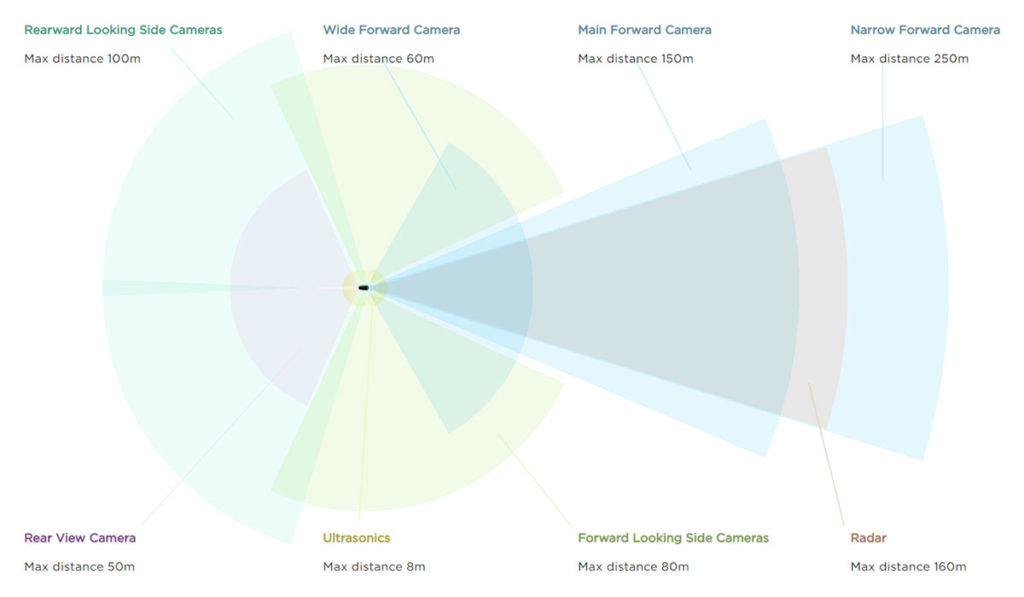
Tesla vehicles with Hardware Suite 2.0+ (Model 3/Y since the first production, Model S/X produced after August 2017) create the car’s 360° vision with the help of 8 cameras (3 in the front, 2 on the side repeaters, 2 in both the B-pillars and one rear-view camera), the center touchscreen of a Tesla vehicle shows a 3D visualization of what the car is seeing in its outer environment — a forward-looking radar and 12 ultrasonic sensors supplement Tesla Autopilot vision (illustrated in the following figure).
Detecting humans and objects
With tweaks and bug fixes in every new Tesla software update, the Autopilot capabilities are supposed to grow, the Tesla Mothership also helps a lot in this regard as it gathers more and more real-world driving data from the company’s car fleet of around 1 million vehicles globally.
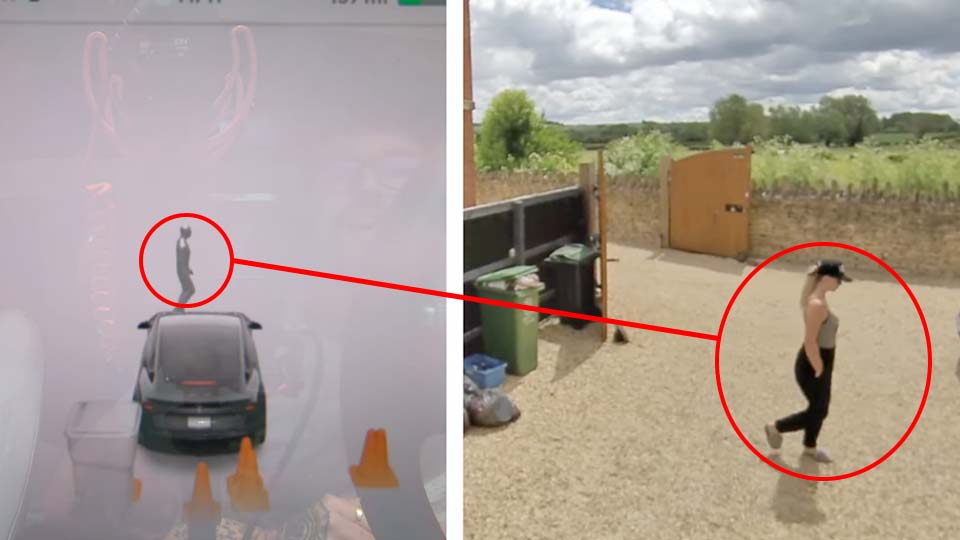
Tesla Autopilot is now able to differentiate between several different objects as we can see in the above screenshot from the video we’re currently discussing (below), on the rear side of the car a bunch of traffic cones and a trash can are lying around and a human is walking in front of the vehicle and the car has drawn it in almost the same posture as it sees her, quite remarkable progress.
In this experiment, the test human walked in different directions and towards and away from the car and Tesla Autopilot correctly calculated the movement in most instances but lacked in a few, also a slight flickering of the human rendering can be seen intermittently.
Detecting Stop Signs and Traffic Lights
The YouTubers/Tesla Owners here did an interesting experiment as one member of the team held an iPad showing a STOP sign and in another instance, a Traffic Light displaying on the screen of the tablet, Tesla Autopilot was able to detect these even if they were showing on a screen on the right side of the vehicle as they are normally placed in countries where the cars are left-hand driven.
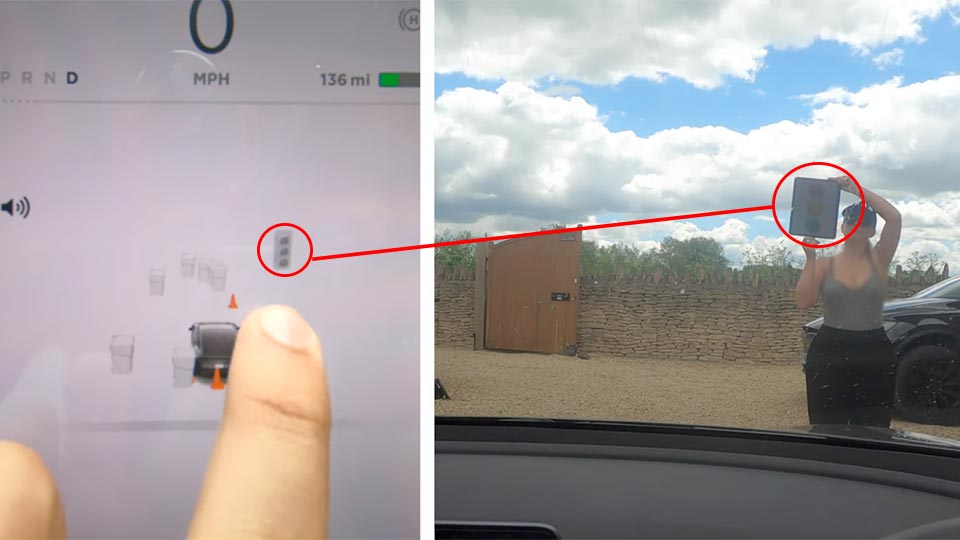
Here Autopilot was not able to detect the colors of the traffic lights on the tablet computer’s screen, this might largely be due to the sunlight glare as we can see in fig 2.2 above that the colors are not very clear to the human eye as well but a good job overall from the ever-learning Tesla Autopilot.
Tesla started wide release of the Stop Sign and Traffic Lights detection software update 2020.12.6 in April this year, most of the important Autopilot features like this one, Smart Summon, and Parallel & Perpendicular Autopark are part of the Full Self-Driving (FSD) package that the automaker is currently offering for a one-time payment of $7,000 — but according to Tesla CEO Elon Musk, the FSD price will increase by $1,000 from July 1st onwards as more and more features get deployed and keep on improving.
A subscription-based payment model for FSD will be introduced but it will not be available anytime soon, the most optimistic timeline would be the end of this year, said Elon Musk at the Tesla Q1 2020 Earnings Call.

More Interesting Tesla Stories:
- ‘Bask in its silent intensity’ — Model Y video review by Kelley Blue Book
- ‘Elon Musk under promises and over-delivers’, Sandy Munro discusses Tesla vs. the auto industry
- ‘Ferrari and Lamborghini are in the same way people use horses now’, Jay Leno’s Model Y review
- ‘Tesla Short Shorts’ are here — demand breaks the Tesla website


.)