

Tesla rolled out a software update version 2023.20.4.1 last week. This update added a new feature that enables Tesla owners to preview camera video feed from all 8 external cameras and 1 internal cabin camera.
This is an interesting new feature that lets Tesla owners watch what the car can see with its suite of Autopilot cameras.
Despite the release notes marking the 2023.20.4.1 update as “minor fixes”, it added Camera Previews and additional information to the tire pressure monitoring system (TPMS) display.

Tesla’s over-the-air (OTA) update version 2023.20.4.1 is a non-FSD Beta update for owners that are not yet part of the FSD Beta testing circle.
According to the Tesla firmware tracker TeslaFi, more than 10,000 out of 19,266 contributing vehicles have received the 2023.20.4.1 update. It’s the fastest Tesla OTA update currently rolling out to the entire global fleet.
Camera Preview Feature (2023.20.4.1)
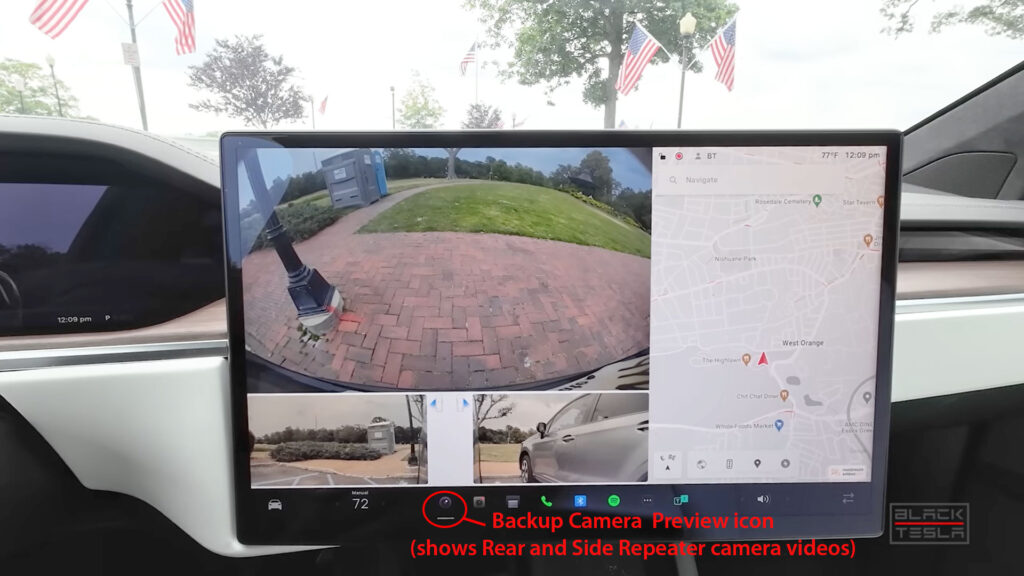
Before the option to preview all 9 cameras, the camera icon on the Tesla center touchscreen UI showed views from only 3 cameras (see Screenshot 1 above). These include the rear or reverse camera and the 2 side repeater cameras (this option is still there). Tesla added side repeater cameras while reversing the car a few years ago in the update version 2020.24.6 under Backup Camera Improvements.
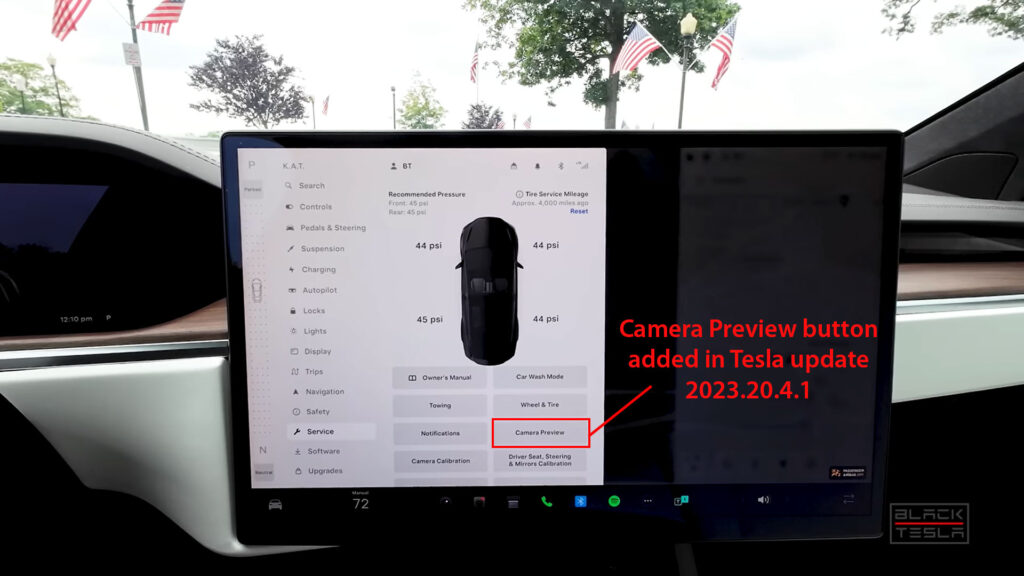
Tesla added a new tab to the Service menu on the center display UI that lets users preview the video feed from the car’s cameras (see Screenshot 3 below). The Camera Preview section can be accessed by going to Controls (car icon on the bottom-left) > Service > Camera Preview.
A side perk of Camera Preview is that the front passengers can at least see themselves clearly on the center screen. This can be handy for female Tesla drivers to adjust their makeup without the need for a vanity mirror.
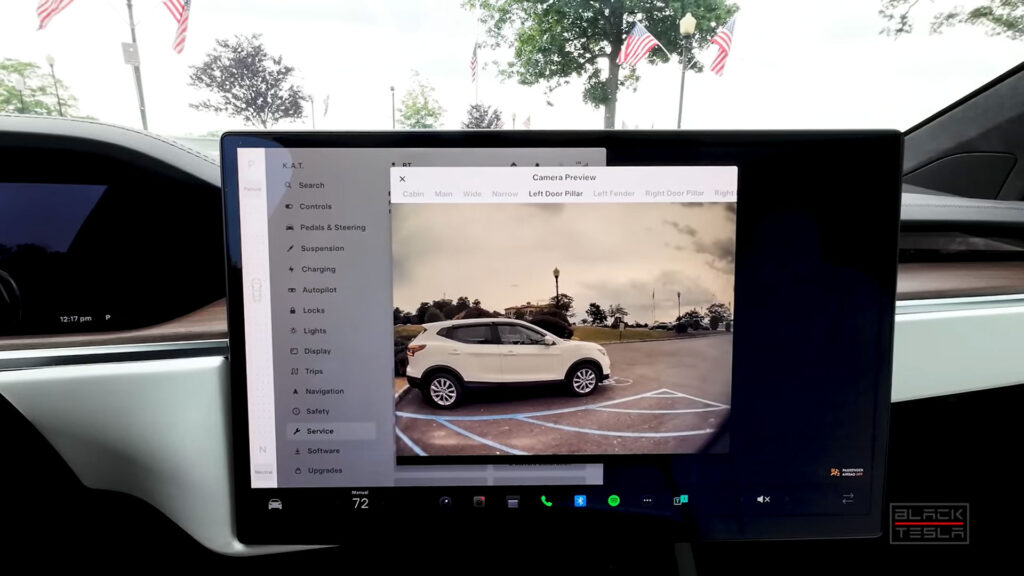
Tesla has provided 9 horizontal tabs to access one camera video feed at a time.
For Autopilot purposes, Tesla has 3 front cameras that are installed behind the rear-view mirror. These 3 cameras are Main, Wide, and Narrow. Tesla has given access to all of these 3 different viewport widths.
Tesla Autopilot and Sentry Mode cameras are installed as follows:
- 3 front cameras (Main, Wide, Narrow)
- 2 in both side repeaters
- 2 in B-pillars
- 1 reverse / rear view
- 1 in the interior cabin
However, the new Tesla cars in production are equipped with Hardware 4.0 (HW4), which is capable of handling video feeds from 12 cameras. Newer Teslas have places to install these 4 additional cameras but are not yet equipped with them.
TPMS Info Improvement in 2023.20.4.1
Tesla has also improved the information display and visualization of the main Service screen. Now this screen shows additional tire pressure management system (TPMS) information (see Screenshot 2 above).
For example, Tesla has now added the Recommended Tire Pressure information on the top left of the car visualization.
On the top right, new Tire Service Mileage information can be seen after the 2023.20.4.1 update. Tesla owners can reset this tire mileage counter when they replace them with new ones. This gives Tesla owners more accurate information on tire usage and helps with their service or replacement intervals.
Let us know your thoughts in the comments section below.
Stay tuned for constant Tesla updates. Follow us on:
Google News | Flipboard | X (Twitter) | WhatsApp Channel | RSS (Feedly).
Related
- Tesla rolls out FSD v14.3 Lite (2026.38.5.1) to legacy HW3 Model S/X vehicles with Intel GPU

- Tesla FSD v14.3.12 with Halloween Update (2026.38.5) goes wide release (demo videos, release notes)

- Tesla begins the FSD v14.3.11 (2026.33.5) update rollout (first impression videos, release notes)
- Tesla Emergency Drive Away feature can cost $25K in Supercharger damages, coming in the 2026.38.3 update to the US only

- Tesla update 2026.38 improves car visuals and adds auto-leveling headlights for legacy HW3 cars (NHTSA recall, release notes)

- Tesla rolls out FSD v14.2 Lite: legacy Tesla owner reviews, rollout status



If they haven’t already done it, Tesla might want to offer folks the ability to easily store all the video on to SD memory, which is relatively cheap these days. There are many circumstances where having access to the footage could be of great value.