

Tesla has started the wide rollout of the 2025.32.3.1 over-the-air (OTA) software update to its fleet of global cars. This is a subversion point release of the main 2025.32 software update branch.
In the 2025.32.3.1 update, Tesla has silently fixed a compatibility issue between the Start FSD (Supervised) from Park and PIN to Drive features.
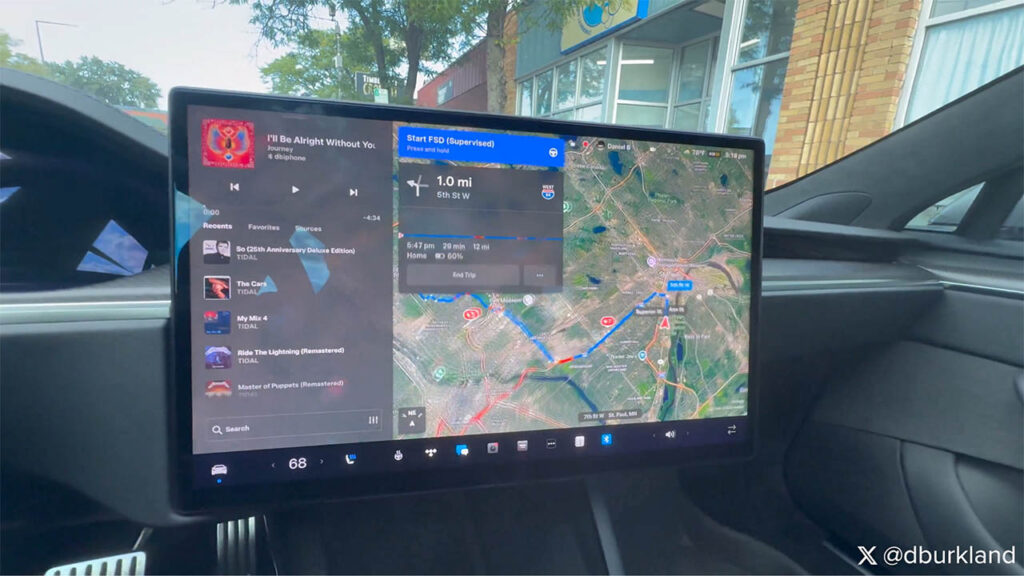
Before this update, if you had the PIN to Drive feature enabled, the Start FSD (Supervised) button was not available in a parked Tesla vehicle. However, this has changed with the 2025.32.3.1 update. However, the fix has not been mentioned specifically in the official release notes.
Tesla introduced the PIN to Drive feature in 2018. This enhances the security of a Tesla vehicle by requiring a secret 4-digit PIN code to move the vehicle.
However, FSD (Supervised) was not available from a parking lot or your garage as you start the vehicle if you had PIN to Drive enabled, as both features didn’t work together before the 2025.32.3.1 update.
Tesla owner and influencer Dan Burkland discovered that the compatibility issue has been solved as he drove his Tesla after installing the 2025.32.3.1 software update.
In the following video, he posted on X, Dan shows us how the FSD (Supervised) from Park feature is now available as soon as you wear your seatbelt. After pressing the Start FSD (Supervised) while the vehicle is parked, the screen asks you for your PIN and Full Self-Driving takes control of the vehicle.
Tesla Update 2025.32.3.1 Rollout Status
Tesla is fast transitioning its global fleet from the previous 2025.32 and subversion 2025.32.3 software updates.
According to tracking stats by TeslaFi.com and Tessie, the latest point release 2025.32.3.1 update is installed on ~16% of the Tesla fleet as of this writing.
In the coming days and weeks, the majority of Tesla vehicles will get the 2025.32.3.1 update.
Start Full Self-Driving (Supervised) from Park
You can also activate Full Self-Driving (Supervised) when Model Y/3/S/X is in Park.
- First, enable this feature by touching Controls > Start FSD (Supervised) from Park. Brake Confirm is enabled by default. When Brake Confirm is enabled, you will need to briefly press the brake pedal to confirm each time you start Full Self-Driving (Supervised) from Park.
- (Optional) Enter a destination. If you do not choose a destination, Model Y chooses the most probable driving path or suggests a destination based on your driving.
- Touch and hold Start FSD (Supervised) on the touchscreen and, if prompted, press the brake pedal to continue. Model Y shifts into Drive or Reverse as necessary, pulls out of the parking space, and begins navigating to your destination.
To cancel Full Self-Driving (Supervised) once Model Y has begun the trip, tap the brake pedal or use any of the methods listed in Canceling Full Self-Driving (Supervised).
Source: Tesla owners manual

Stay tuned for constant Tesla updates. Follow us on:
Google News | Flipboard | X (Twitter) | WhatsApp Channel | RSS (Feedly).
Related Tesla Software Updates News
- Tesla rolls out FSD v14.3 Lite (2026.38.5.1) to legacy HW3 Model S/X vehicles with Intel GPU
- Tesla FSD v14.3.12 with Halloween Update (2026.38.5) goes wide release (demo videos, release notes)

- Tesla begins the FSD v14.3.11 (2026.33.5) update rollout (first impression videos, release notes)
- Tesla Emergency Drive Away feature can cost $25K in Supercharger damages, coming in the 2026.38.3 update to the US only
- Tesla update 2026.38 improves car visuals and adds auto-leveling headlights for legacy HW3 cars (NHTSA recall, release notes)
- Tesla rolls out FSD v14.2 Lite: legacy Tesla owner reviews, rollout status


 from Park and PIN to Drive (details, video).)