
Apparently, Tesla rolled out more undocumented features in the 2026.2.3 update than it announced in the official release notes. However, these hidden features and subtle changes are for the more nerdy type of Tesla owners.
In the 2026.2.3 update, the tech & AI automaker added new FSD data trip weights to Service Mode for Hardware 3 (HW3) Tesla vehicles (details below).
Other hidden features include improvements in the matrix headlights’ behavior and automatic battery recalibration. A Tesla owner also shared the improvement he experienced in the Auto Park feature after installing the 2026.2.3 update (watch below).
Interestingly, Tesla has removed the extra build number from the Navigation Data version information (undocumented). After installing the 2026.2.3 update, only the main version and regional code (US, ME, EU) are shown as the prefix.
You can play around with this interactive wiring diagram in Service Mode
— Cybertruck (@cybertruck) January 8, 2026
Tap any connector to see what each wire does & where it runs, all in real time https://t.co/VRAFOGG5PW pic.twitter.com/XBQ3unkhgi
Service Mode FSD Trip Weights
Service Mode is an interesting and useful feature of Tesla vehicles. This backend interface for diagnosing and fixing issues with the vehicle was previously only available to service personnel. But now, Tesla has allowed access to its customers to access this feature.
After installing the 2026.2.3 update, several Hardware 3 (HW3) Tesla owners observed that the car is now showing Autopilot Trip Weights. This suggests that the vehicle is now gathering and uploading FSD AI data in shadow mode. Previously, this was only working in the HW4/AI4 vehicles.
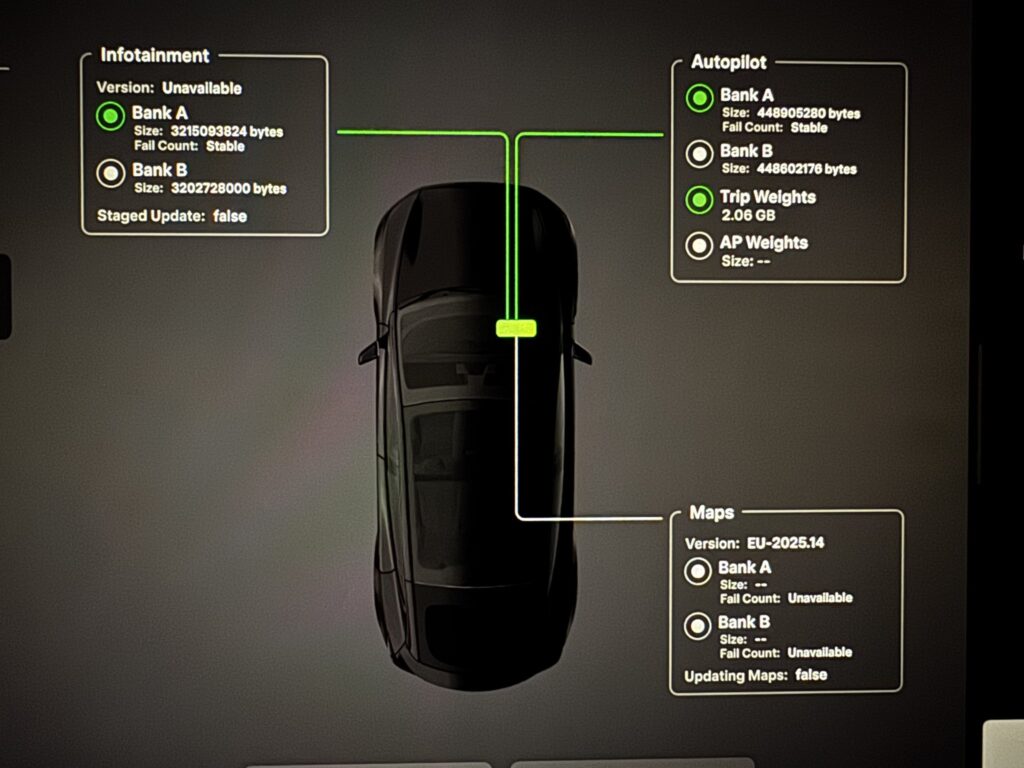
What are Autopilot Trip Weights?
An X user asked Grok about what is meant by Trip Weights. Musk’s AI bot replied:
In Tesla’s 2026.2.3 update, “Trip Weights” refers to the active neural network weights loaded during a drive for Autopilot/FSD. It’s a new, undocumented feature in Service Mode, likely for diagnostics on how the AI model performs per trip. AP Weights are the static ones stored on the vehicle. HW3 cars now support this too.
Automatic Battery Recalibration
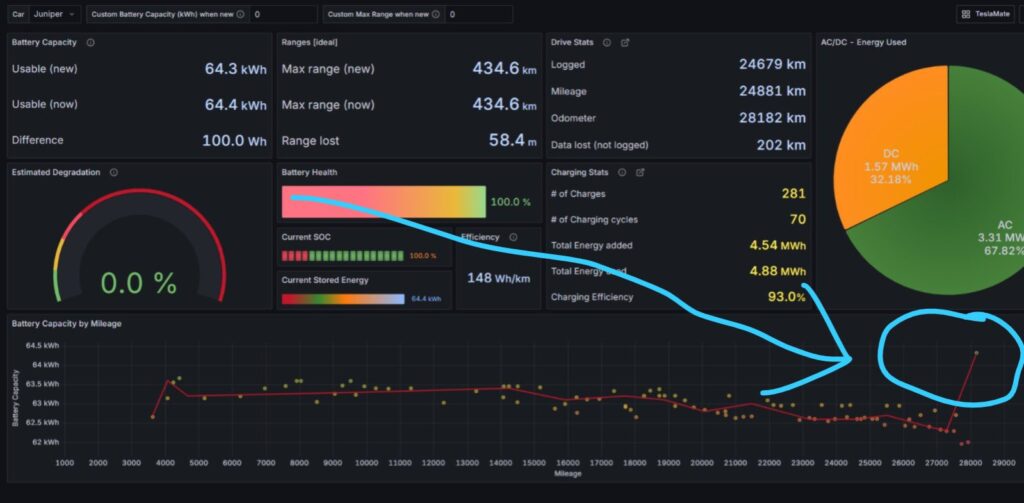
Some Tesla owners experienced an instant jump in their gross available range after installing the 2026.2.3 update. This was due to the automatic recalibration of the battery pack.
Usually, you have to follow a set of instructions to recalibrate your Tesla’s battery. Over time, and because of different parameters in software updates, the available range on a Tesla might degrade. The 2026.2.3 software update has apparently fixed these issues, but we will need more data to confirm that this is happening on all Teslas.
Matrix Headlights Improvement
Multiple Tesla owners have reported improved behavior and function of the automatic Matrix Headlights after installing the 2026.2.3 software update. Now, the vehicle is sensing light and reflections even better, and the headlights are responding accordingly.
Service Mode is also showing an update to the Matrix Headlights function.

Autopark Improvements
In the following video, a Tesla owner compares the Autopark feature before and after installing the 2026.2.3 update in the same parking location.
The vehicle demonstrated more confidence and smoothness while automatically parking after getting the 2026.2.3 update.
Stay tuned for constant Tesla updates. Follow us on:
Google News | Flipboard | X (Twitter) | WhatsApp Channel | RSS (Feedly).
Related Tesla Software Updates News
- Tesla rolls out FSD v14.2 Lite: legacy Tesla owner reviews, rollout status
- Tesla rolls out FSD v14.3.9 (2026.27.6) with Automatic Collision Evasion: feature details and official release notes
- Tesla merges FSD v14.3.8 and the Summer Update (2026.26.6.5), Grok voice commands gain more control

- Tesla FSD v14.3.7 fixes regressions found in the previous version (video reviews)

- Tesla Summer Update 2026.26: features, release notes, and rollout status
- Tesla owners report regressions in FSD v14.3.6 (2026.20.6.11), the update still goes wide release