Cybertruck update 2025.2.9 fixes the oil pump failure issue

-

-Advertisement-

Tesla (TSLA) started deploying the OTA update software version 2025.2.9 last week. In addition to the audio issues in 2025.2 and later point releases, some Cybertrucks are having bigger problems after installation.

The Issue

A Cybertruck owner reported some Service Alerts popping up on the center touchscreen after installing the 2025.2.9 firmware update. The scariest of these is the “Oil Pump Failure” alert. The code for this alert is “DIF_a149_oilPumpFailure”.

After this issue was posted to X (Twitter) by @cybrtrkguy (The Cybertruck Guy), another Cybertruck owner also confirmed that he’s having the same oil pump failure issue.

– Advertisement –
Tesla Cybertruck service and oil pump failure (front motor) issues fixed by re-installing the 2025.2.9 OTA firmware update.
Screenshot: Cybertruck showing incompatible drive unit software alert after installing the firmware update version 2025.2.9. Credit: The Cybertruck Guy / X (Twitter).

As we can see in the screenshot above, Cybertruck’s center display shows an alert saying, “Incompatible drive system software detected. OK to drive—Schedule service to update software.”

This is the error that a Cybertruck owner sees on the main screen but it does not show the specific part of the drive unit that’s having trouble. The exact details are mentioned on the Service Mode screen (screenshot below shows how to enter Service Mode).

Screenshot: Step-by-step instructions to enter Cybertruck Service Mode from the center touchscreen display.
Screenshot: Step-by-step instructions to enter Cybertruck Service Mode from the center touchscreen display. Credit: Courtesy of Tesla, Inc. (TSLA), edited by Iqtidar Ali / TeslaOracle.com.
– Advertisement –
Cybertruck Service Mode screen shows the details of the Oil Pump Failure issue and possible remedy.
Screenshot: Cybertruck Service Mode screen shows the details of the Oil Pump Failure issue and possible remedy. Credit: The Cybertruck Guy / X (Twitter).

This error is caused by a mismatch of the firmware with the Cybertruck front drive unit oil pump. The first installation of the 2025.2.9 possibly had a bug or the installation process was interrupted somehow, creating this problem.

Because the front motor’s oil pump is not working properly, the Cybertruck’s internal system limits the power output and speed of the vehicle. This is the protect the drive unit from excessive wear and tear if it’s not getting the lubrication and cooling it requires on high speeds.

Cybertruck automatically limited the speed of the vehicle to 68 mph because of the Oil Pump Failure alert. In this case, this is not a hardware / physical failure, just a mismatch of firmware due to a bad installation or unmatched version number. This software glitch is causing a lack of communication between the vehicle’s computer and the oil pump.

Tesla Accessories by EVANNEX.
– Sponsored –
– Advertisement –

Cybertruck Oil Pump

An oil pump in a Tesla car or Cybertruck is different compared to one in a legacy ICE vehicle. Tesla uses oil pumps to keep the drive units (motors) lubricated and cooled during high-intensity use.

In a Cybertruck, the oil pump is installed under the Cybertruck front drive unit motor. @cybrtrkguy shared the following picture of the installed oil pump that was having issues due to a mismatched firmware version.

The interesting fact about Tesla vehicles is that even a tiny part like this oil pump is connected to the core system and generates alerts if there is an issue or failure.
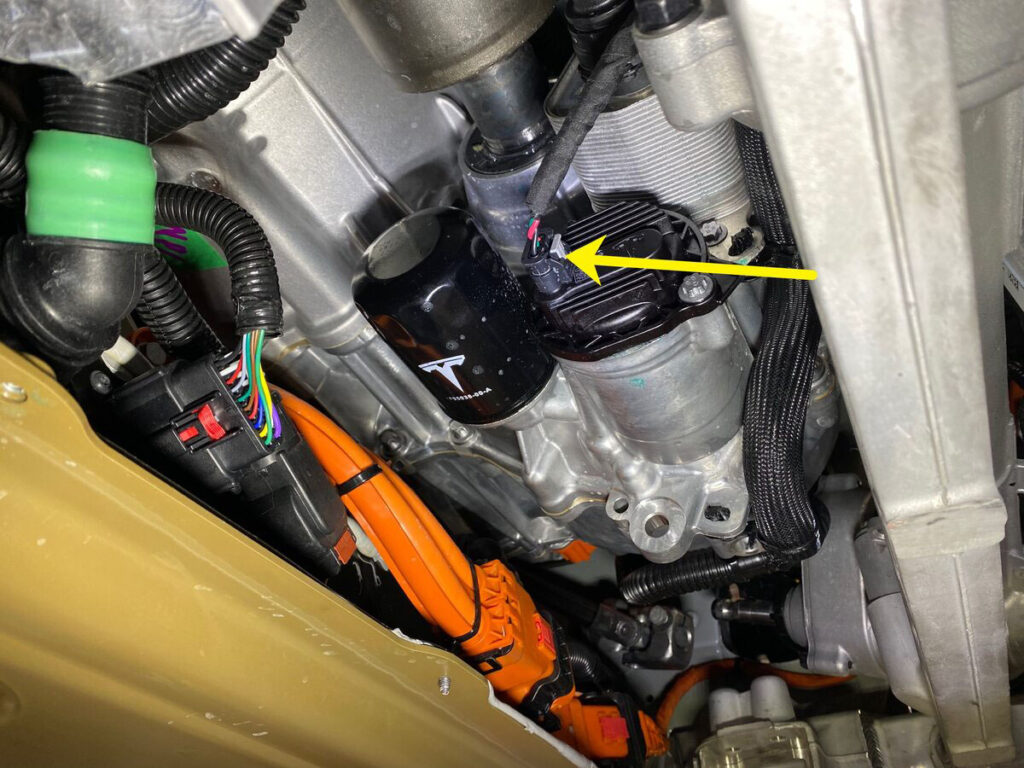
Location of an oil pump in a Tesla vehicle installed at the front drive unit (motor).
Location of an oil pump in a Tesla vehicle installed at the front drive unit (motor). Credit: The Cybertruck Guy / X (Twitter).
– Advertisement –

The Fix

@cybrtrkguy contacted the Tesla Grand Rapids Service Center located in Kentwood, Michigan. The Tesla team from this service center pushed a re-install of the 2025.2.9 over-the-air (OTA) softwar update and it fixed the Oil Pump Failure issue.

The rest of the alerts showing on the screen were also fixed.

Stay tuned for constant Tesla updates, follow us on: 
Google News | Flipboard | X (Twitter) | WhatsApp Channel | RSS (Feedly).

Related Tesla Software Updates News

Iqtidar Ali
Iqtidar Alihttp://www.teslaoracle.com
Author of more than 1500 articles on Tesla, SpaceX, and EVs. His work has been liked and tweeted by Elon Musk and other prominent influencers. You can reach him on Twitter @IqtidarAlii

Latest News

Belgium approves Tesla FSD, automaker shares ~2 months of safety and usage stats from the Netherlands

Tesla's Full Self-Driving (Supervised) AI technology gets another approval from a European country. Belgium has now approved Tesla FSD...

Tesla FSD gets approved in Denmark, Europe receives the FSD v14.2.2.6 (2026.17.5) update

Tesla (TSLA) and its CEO, Elon Musk, have just announced on X that the company's Full Self-Driving (FSD) is...

Unsupervised Tesla Robotaxi gets a $75 parking ticket as ARK Invest’s Cathie Wood takes a ride for review (video)

The expansion of the Unsupervised Tesla Robotaxi ride-hailing service in Austin, Texas, got the attention of one of the...

Tesla expands Unsupervised Robotaxi Service to the entire Austin Metro Area, Cybercabs spotted across the US

After a gradual extension of the Tesla Robotaxi Service area in the last 12 months since its launch, Tesla...
- Advertisement -

Stay tuned with the updates in your Inbox

Get the latest Tesla FSD, Software Updates, Starship News in Your inbox.

By hitting the Subscribe button you agree to receiving email communications from TeslaOracle.com.
We don't email everyday. Frequency will be weekly at max.

Know why the FAA triggered an investigation into SpaceX’s Flight 12 Starship launch

According to the US Federal Aviation Administration (FAA), SpaceX's Starship Flight 12 Super Heavy rocket booster experienced an anomaly...

American Airlines to integrate in-flight Starlink satellite broadband from 2027

Elon Musk's space-launch and exploration company SpaceX has bagged another big customer for its Starlink satellite broadband. On Monday, American...

SpaceX shares stunning buoycam footage of Flight 12 Starship’s landing burn

The Starship's Flight 12 saga continues. Yesterday, Elon Musk's space-launch and astronautics company, SpaceX, shared additional footage of Starship...

Tesla Tips & Tricks

Here’s how to use Tesla’s dashcam tool to remove encryption from video clips (update 2026.20 or later)

In the recent over-the-air (OTA) software update version 2026.20,...

Tesla phone app lets owners remotely melt snow off their cars (video)

Tesla cars have some super-nice climate features that other...

Tesla Quarterly Reports & Eearnings

Tesla (TSLA) vehicle deliveries grew ~6% in Q1 2026 YoY despite challenges, energy business is down ~15%

Tesla, Inc. (TSLA) disclosed its first-quarter vehicle production and...

Tesla Q4 2025: Financial Results, Key Takeaways from Elon Musk’s Earnings Call, more

The Tesla (TSLA) Q4 2025 Earnings Call was important...

Stay tuned with the updates in your Inbox

Get the latest Tesla FSD, Software Updates, Starship News in Your inbox.

By hitting the Subscribe button you agree to receiving email communications from TeslaOracle.com.
We don't email everyday. Frequency will be weekly at max.
- Advertisement -

You might also likeRELATED
Recommended for You