Tesla’s over-the-air (OTA) update 2025.20.3 has become the most widely rolled-out version as of the first week of July. This update was first detected on 28th June.
Tesla update 2025.20.6 is going out to both the older HW3/AI3 vehicles with FSD v12.6.4 and the new HW4/AI4 vehicles with FSD v13.2.9. The rollout is global, so non-FSD Tesla cars outside of North America are also getting this update.
According to Tesla software rollout data statistics by TeslaFi.com and Tessie.com, around 50% of the Tesla global fleet of cars has received the new 2025.20.6 update as of this writing.
Although the official release notes of this update mention only Security Improvements, depending on the location of the Tesla vehicle, some features have been deployed or improved. After installing the 2025.20.6 update, some Tesla owners are facing issues and bugs with the backup camera and on-screen navigation maps (see below).
Official Release Notes: Tesla Update 2025.20.6
Child Left-Behind Detection (Europe)
Almost all Teslas are equipped with a cabin radar that detects objects, pets, and humans inside the vehicle. At first, this radar was used to check front seat occupancy, but now Tesla is using it to check for rear seat occupancy as well.
This radar has eliminated the need for separate seat sensors. This means a lower cost of parts. A smaller number of sensors also lowers the burden of constantly checking multiple points in the vehicle (less processor load).
The 2025.20.6 release notes describe the Child Left-Behind Detection feature as (translated):
Detection of Left-Behind Child
When a child is detected without supervision, the exterior signal lights will flash, a warning signal will sound, and you will receive a notification via the Tesla app. This will be repeated regularly until you are back at your car. Interior data is processed locally and not sent to Tesla.
Credit: Jason DM / X.

Tesla started deploying the Child Left-Behind Detection feature for Europe in the 2025.14.12 OTA update in April. However, with the wide rollout of the 2025.20.6 software update, this feature is reaching more Tesla vehicles in Europe.
Deployment of the Child detection feature has not yet started in North America.


Security Improvements
This update includes important security fixes and improvements.
Other Features
The Unlatching Charge Cable using Door Handle and Supercharging Live Activity features are now deployed widely. These features were first detected in the previous 2025.20.3 Tesla software update.
Issues and Bugs
After installing the 2025.20.6 software update, some Tesla owners reported issues and bugs.
Black Patches in Nav
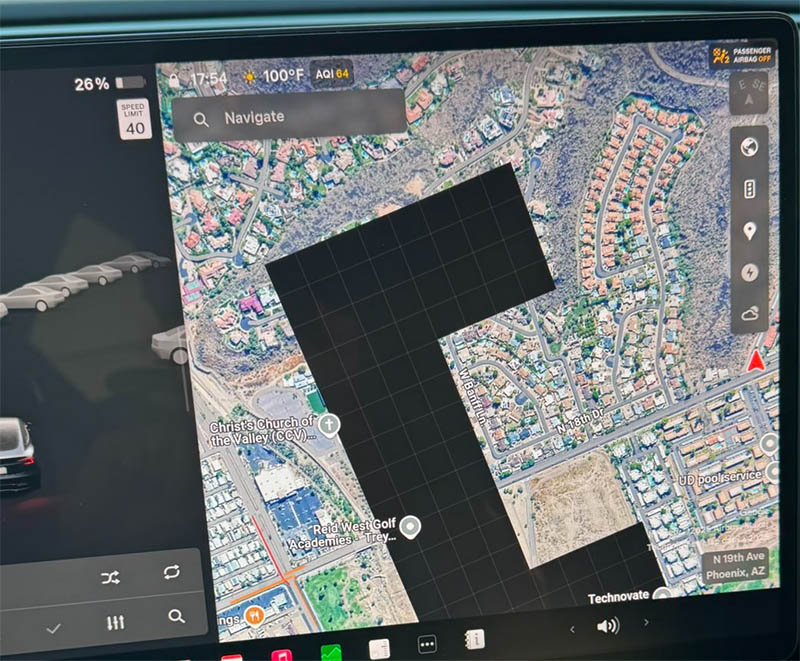
A Tesla Model 3 (Highland) owner posted on X that his navigation maps on the center touchscreen now had black patches. Some areas of the on-screen navigation were blacked out, hiding the map locations and navigation points.
“After recently receiving 2025.20.6 my maps gets this big black blob on screen,” the Tesla Model 3 owner wrote on X.
Backup Camera Issue
The owner of a Tesla legacy HW3/AI3 hardware-based vehicle reported on X that his backup/reverse camera was failing most of the time after installing the 2025.20.6 update. Because of this issue, he was also not able to use Full Self-Driving (FSD) on his Tesla vehicle.
In the same discussion thread on X, other Tesla owners also reported the same issue. Although this bug does not seem to affect a wide number of Tesla vehicles, it’s at least impacting a small percentage of users after installing this update.
Davide Lewis wrote on X:
For whatever reason, since upgrading my Tesla to 2025.20.6 with HW3 (FSD 12.6.4), my backup camera was failing 80% of the time – meaning that I could not use FSD. The solution was to run “Reset Driver Assistance (DAS)” from the service mode menu.
He also shared the following screenshot of the Tesla Service Mode while resetting the Driver Assistance (DAS) ECU.

Stay tuned for constant Tesla updates. Follow us on:
Google News | Flipboard | X (Twitter) | WhatsApp Channel | RSS (Feedly).
Related Tesla Software Updates News
- Tesla Emergency Drive Away feature can cost $25K in Supercharger damages, coming in the 2026.38.3 update to the US only
- Tesla update 2026.38 improves car visuals and adds auto-leveling headlights for legacy HW3 cars (NHTSA recall, release notes)
- Tesla rolls out FSD v14.2 Lite: legacy Tesla owner reviews, rollout status
- Tesla rolls out FSD v14.3.9 (2026.27.6) with Automatic Collision Evasion: feature details and official release notes
- Tesla merges FSD v14.3.8 and the Summer Update (2026.26.6.5), Grok voice commands gain more control
- Tesla FSD v14.3.7 fixes regressions found in the previous version (video reviews)